
-20260211122832.webp&w=3840&q=75)
The recent Windows Remote Access Connection Manager 0-Day vulnerability has IT admins and security teams on edge. This flaw hits a key Windows component that handles VPN and dial-up connections, and early reports show attackers can remotely trigger a denial-of-service condition in certain setups.
If your organization leans on remote access, this isn't just another patch to-do. A glitch in the Remote Access Connection Manager service could knock out VPN users, branch offices, and your whole remote workforce setup.
In this guide, we'll unpack what went down, how the vulnerability ticks, why it packs a punch in today's threat world, and your next moves. Whether you're a SOC analyst, sysadmin, or cybersecurity student, I've kept it technical but straightforward, no fluff.
What Is the Windows Remote Access Connection Manager 0-Day Vulnerability?
The Windows Remote Access Connection Manager 0-Day vulnerability is a security hole found in the Windows Remote Access Connection Manager service before Microsoft had a patch ready.
To get it, let's start with the basics.
What Is Windows Remote Access Connection Manager?
The Windows Remote Access Connection Manager is a service that runs on Windows and
• Controls VPN connections
• Manages dial-up connections
• Sets up remote access sessions
• Works with the Remote Access Service subsystem
It's very important for businesses where remote workers connect through VPN. The service talks to authentication modules, networking bits, and system APIs to make safe remote connections.
When a Windows zero-day exploit hits this, remote access goes down across the board.
-20260211122833.webp&w=1080&q=75)
Windows Remote Access Connection Manager 0-Day Vulnerability Overview
A zero-day vulnerability means it was spotted before any patch dropped. Here, attackers can spark a denial-of-service condition in the Remote Access Connection Manager service.
This isn't about data breaches; it's a Remote Access Connection Manager DoS vulnerability focused on crashing the service, not stealing data or running code. Still, in enterprise networks, that's no small thing.
What Happened?
Researchers spotted weird crashes in the Windows RAS service from dodgy network requests. Under the right conditions, these crafted packets make the service bail out.
Key bits:
Improper input validation within the RAS service
Failure to safely handle malformed authentication negotiation packets
Service crash leading to VPN disconnection
Potential repeated triggering to sustain outage
No patch at first disclosure, hence the Windows RAS 0-day vulnerability label. Microsoft later issued a security advisory with mitigation tips while cooking up a fix.
Why the Windows RAS 0-Day Vulnerability Matters
Remote access is the backbone of modern ops. An exploited Windows RAS DoS attack vulnerability can:
Disconnect active VPN users
Block new remote connections
Mess up hybrid workforce operations
Hamper IT admins doing remote maintenance
This ramps up Windows DoS attack risk, especially for financial institutions, healthcare networks, government agencies, and managed service providers. Unlike malware needing creds, DoS just crashes the party.
How the Remote Access Connection Manager DoS Vulnerability Works
Quick rundown on remote sessions: A client starts a VPN connection by negotiating authentication, processing params via RAS service, validating creds, and tunneling securely.
This Windows Remote Access vulnerability? Crafted packets mess with that negotiation.
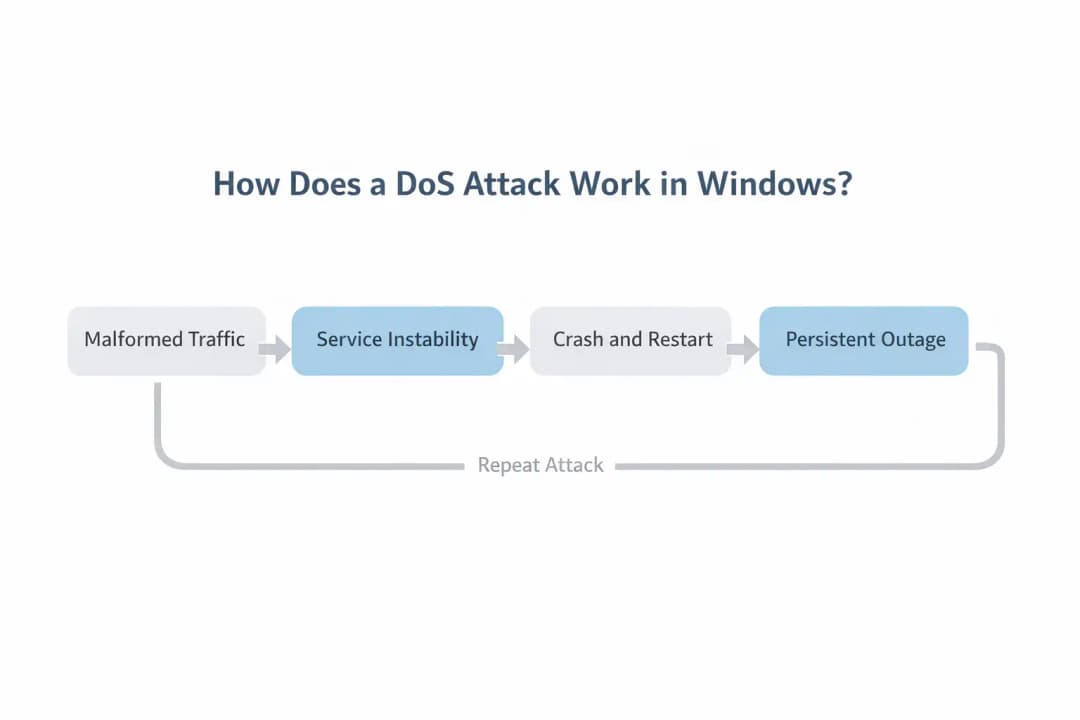
How Does a DoS Attack Work in Windows?
DoS in Windows hacks:
• Mistakes when handling memory
• Not managing the buffer well
• Conditions of resource exhaustion
Not handling exceptions correctly
In this case, bad packets cause memory problems in the RAS service. When a crash happens, Windows tries to restart or leaves it dead until someone fixes it.
Repeat the traffic? Persistent outage, classic persistent service denial.
Real-World Attack Scenario
Picture a mid-sized firm with 2,000 remote staff. The attacker spots the public VPN gateway and fires off malformed RAS negotiation packets; no credentials are needed.
Boom:
Active VPN sessions drop
Employees go dark
Remote IT stops cold
Critical systems unreachable
They loop it every few minutes, no recovery. That's a RAS service denial of service attack crippling ops without grabbing data.
Impact Analysis
The Windows RAS DoS attack vulnerability hits availability hard, one of cybersecurity's big three (with confidentiality and integrity).
Affected Systems
Per Microsoft docs and advisories:
Windows Server editions running RRAS
Windows client systems with Remote Access enabled
Enterprise VPN deployments using native Windows RAS
Not enabled? Lower risk.
Industry Impact
Biggest hits: healthcare (telemedicine), finance (trading portals), government (distributed teams), and IT providers (remote management). Risk ties to exposure.
How to Fix Windows RAS Vulnerability
For a Windows Remote Access Connection Manager 0-day vulnerability, mitigate first, patch second.
Immediate Mitigation Steps
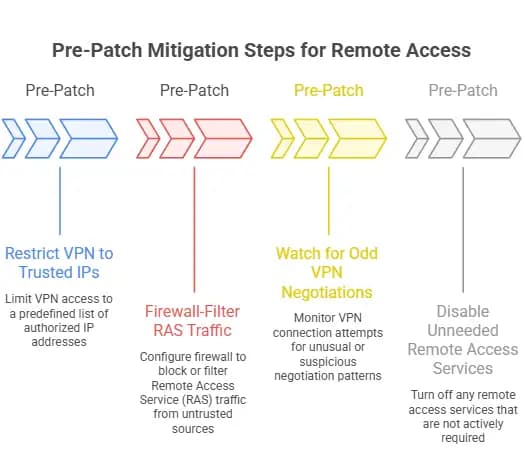
Pre-patch:
Restrict VPN to trusted IPs
Firewall-filter RAS traffic
Watch for odd VPN negotiations
Disable unneeded remote access services
Safe? Depends on the config; Windows Remote Access service isn't risky by default, but public exposure is.
Windows RAS 0-Day Patch Available
Patch drops?
Check Microsoft's security advisory
Test in staging
Roll out in maintenance windows
Verify post-update
Skip shady sources.
How to Disable Windows Remote Access Connection Manager
Not needed? Kill it via:
1. Services console
2. Group Policy
3. PowerShell command
Cuts Remote Access Service exploit risk.
Common Misconceptions
Misconception 1: DoS is low risk. Nope, downtime costs big in high-availability setups; Windows DoS attack risk is real.
Misconception 2: Zero-day = mass exploits. Not always; stick to official intel.
Misconception 3: VPN crash = breach. This Windows Remote Access vulnerability is a disruption only, not exfil.
Broader Security Lessons
The Windows RAS 0-day vulnerability reminds us:
Exposed services = bigger targets
Least functionality cuts risk
Monitor crashes closely.
Patch nonstop
Treat remote access like critical infrastructure.
Hoplon Insight Box
Expert Recommendation from Hoplon Infosec Cybersecurity Services
Regular remote access exposure audits
Segment VPN gateways from core nets
Log RAS negotiation failures
Quarterly firewall reviews
Incident playbooks for disruptions
Hardens you against zero-days.
Future Implications
Zero-day in core Windows services? Legacy networking stays hot. With hybrid work booming:
Go zero trust
Conditional access
Monitor weird VPN behavior
Ditch legacy protocols for identity-driven access
Conclusion
The Windows Remote Access Connection Manager 0-Day vulnerability spotlights availability security. DoS hits remote ops hard.
Patch fast, monitor hard, and expose less. Connectivity = security these days.
Frequently Asked Questions
1. What is Windows Remote Access Connection Manager?
Windows service for VPN/dial-up remote sessions.
2. What is a Windows RAS 0-Day vulnerability?
Unknown Windows Remote Access Service flaw pre-patch.
3. How does a DoS attack work in Windows?
Exploits memory/resource flaws to crash services.
4. Is Windows Remote Access service safe?
Yes, if configured, patched, restricted, and public internet ups risk.
5. How to fix Windows RAS vulnerability?
Official patches restrict access, log/monitor, and disable unused.
6. Can this vulnerability lead to data theft?
No, it's denial of service, not exfil.





